Block Link
Connect every block in one line.
Block Link is a one-line puzzle: draw a single unbroken line that passes through every block on the board. Start at the white ring, drag into a neighbouring block, and keep going - each block may be visited exactly once, and the line has to finish on the golden star.

Game overview
What is Block Link?
Every level is generated together with its solution, so each one can be finished. Early boards have only a handful of blocks; later ones grow denser and add holes that decide the order of your route. A new Today's Challenge course opens every day as well.
At a glance
- Drag from the white ring into a block next to it - up, down, left or right.
- Pass through every block exactly once. You can lift your finger and carry on from the end of your line.
- Took a wrong turn? Drag back over your line to undo one block at a time.
- Finish on the golden star with every block filled to clear the level.
One line through every block
Each level is a little island of square blocks. One of them has a white ring, which is where your line begins, and one has a golden star, which is where it must end. Draw a single continuous line from the ring to the star that passes through every block exactly once. The line moves only up, down, left or right, never diagonally, and it can not cross itself or visit a block twice. A block you have passed lights up in colour, and the counter at the top shows how many of the level's blocks are filled.
If you let go with nowhere left to go, or fill every block but stop somewhere other than the star, the line resets and you try again from the ring. Every level is created together with its own solution path, so there is always at least one way through.
Controls
Press on the white ring and drag into a neighbouring block to start drawing.
You can lift your finger at any time and carry on from the end of the line.
Took a wrong turn? Drag back along your own line and it rewinds one block at a time.
To start the level over, tap the reset button at the top right, or tap the starting ring twice quickly.
How the levels grow
There is no level select and no chapters. Clearing a level takes you straight to the next, and the levels never run out. The first boards are tiny, with only five or six blocks, so the rules sink in quickly. The block count climbs with every level: about 24 by level 20, around 42 by level 40 and up to 56 on the biggest boards.
From level 8 on, boards start to have holes in the middle. A hole is an empty space your line has to go around, and it quietly decides the order in which you can visit the blocks around it. Levels 8 to 19 have one hole, levels 20 to 34 have two, 35 to 59 have three, and from level 60 every board has four.

Today's Challenge
Alongside the main levels there is a new course every day. A course is 20 short boards played back to back against the clock. If you get stuck on a segment, five seconds are added to your time and that segment restarts, so you can always finish. Your total time decides the medal: four minutes or less is gold, six minutes or less is silver, and anything slower still earns bronze. You can open past days from the calendar, and finishing every day of a month earns that month's trophy.


Tips for your first levels
A block with only one free neighbour can only be the end of a dead end. Plan to pass through blocks like that early, or they will be cut off.
The star has to be the very last block. Leave a corridor that leads to it and fill the rest of the board before you go in.
Before drawing, follow a possible route in your head around the holes. Holes are often what decides whether you sweep a row left to right or snake through it.
Dragging back along the line keeps the part that was correct. Resetting is only worth it when the very first moves were wrong.
In the app, the light bulb reveals the first stretch of a solution path. It is a quick way to see how a tricky start is meant to go.
Step by step
Guides for Block Link
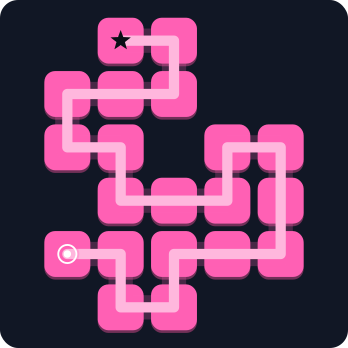
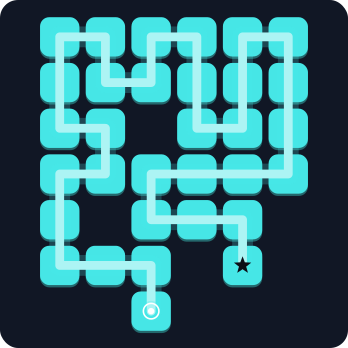
Each guide takes one real board from the game and solves it move by move, with a picture for every step.
Why players come back
Features
- Endless levels, each generated with a guaranteed solution
- Today's Challenge: a new 20-segment course every day, with gold, silver and bronze medals and a monthly trophy
- No timer and no game over in the main levels - hints whenever you want one
- Offline play, auto-save and 14 languages - free on Google Play
Common questions
Frequently asked questions
Is Block Link free?
Yes. It is free on Google Play. The app shows a small banner and an ad between some levels, and offers optional purchases: ad removal, a starter pack and hint bundles. Hints from a rewarded ad remain available even after ads are removed.
Can I play without an internet connection?
Yes. The main levels and Today's Challenge both work offline, and your progress is saved on the device and synced when you are back online.
Will I lose a challenge run if I leave?
No. A Today's Challenge run is saved as you go, and you can resume it from the home screen.
Is there a timer in the main levels?
No. Only Today's Challenge is timed. Main levels have no time limit and no game over; a stuck line simply resets.
Which languages are supported?
Block Link is available in 14 languages, including English, Korean and Japanese.